Site operation
As you can see the operation for this website, is fast, secure and reliable. The structure was simple; I used Hugo to build the website, resulting to what you can see now.
How is it hosted
To host a static website is pretty much straight forward using AWS Services to make this possible and cheapest possible way.
How is it done and what considerations did I take?
Let’s first summarise how I’ve did it manually:
- Launch the code using VSCode (“I know”).
- Configure the website as you want, adding the content and making changes.
- Test the website deploying it to your localhost.
- Export the website to HTML and then upload the HTML files on AWS S3.
- Did it via the
awscommand, before that, it was drag and drop.
- Did it via the
- The website will then be published.
Instead, I automated it and I love it. Here’s how:
- Clone repository, create the config file and apply your changes.
- Commit and push the config file changes on GitHub.
- CI/CD (GitHub Actions) YAML specifies the above steps:
- Checkout code
- Build the website with Hugo plugin (marketplace)
- Export and zip html files and upload to artifacts
- Pull the zip folder artifacts and export the files and sync them to S3
Here is an end-to-end (E2E) architecture image that you might find useful:
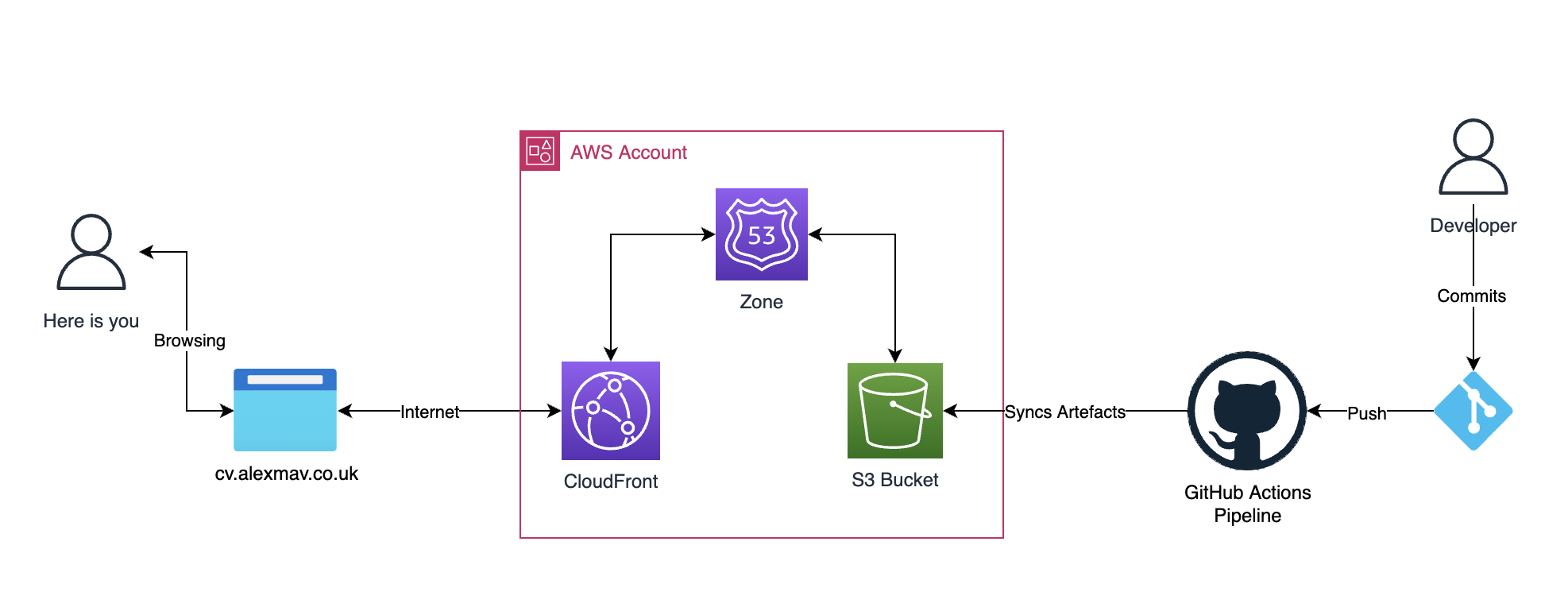
Categorised Tech stack:
- Hosting this website using AWS:
- AWS Route 53
- AWS CloudFront
- AWS S3
- AWS Certificate Manager
- CI/CD Pipeline method:
- Terraform (for infrastructure management)
- GitHub Actions (for updating website content)
- Website Framework:
Here is a link to my GitHub.